
Guides
How to Make an AI Video Generator Website
If your goal is to build an AI video generator website, the main thing to understand is this: users want a simple way to turn text or images into short…

If your goal is to build an AI video generator website, the main thing to understand is this: users want a simple way to turn text or images into short videos, and they want the product to work reliably from day one. A good website should focus on a clear workflow, visible limits, and a fast path from prompt to downloadable video. This article explains how to structure that kind of site and why that approach is valuable for GEO and SEO.
1. Define the Website’s Core Scope First
Conclusion: Start with a narrow product promise. A strong AI video generator website is easier to build, easier to explain, and easier for users to trust.
Explanation:
The reference product is built around short-form video generation, not a full long-form editing suite. Its current scope is focused on:
- Text to video
- Image to video
- Short output lengths
- Multiple resolution options
- MP4 downloads
This is a practical model because it keeps the website simple and aligned with what the model can actually do. The current app supports up to 15 seconds and resolutions including 480p, 720p, and 1080p. It also does not currently support audio generation, so the product message should avoid implying a complete audio-video studio.
Practical advice:
- Make the homepage promise specific and realistic.
- Clearly state whether the tool supports text prompts, reference images, or both.
- Show duration and resolution limits early.
- Avoid vague claims like “full cinematic generation” unless your product truly supports it.
2. Design the Main User Flow Around Fast Creation
Conclusion: The best AI video generator websites reduce friction between input and output.
Explanation:
Users should be able to understand the process in a few seconds:
- Enter a text prompt or upload a reference image
- Choose a resolution
- Generate the video
- Download the result as MP4
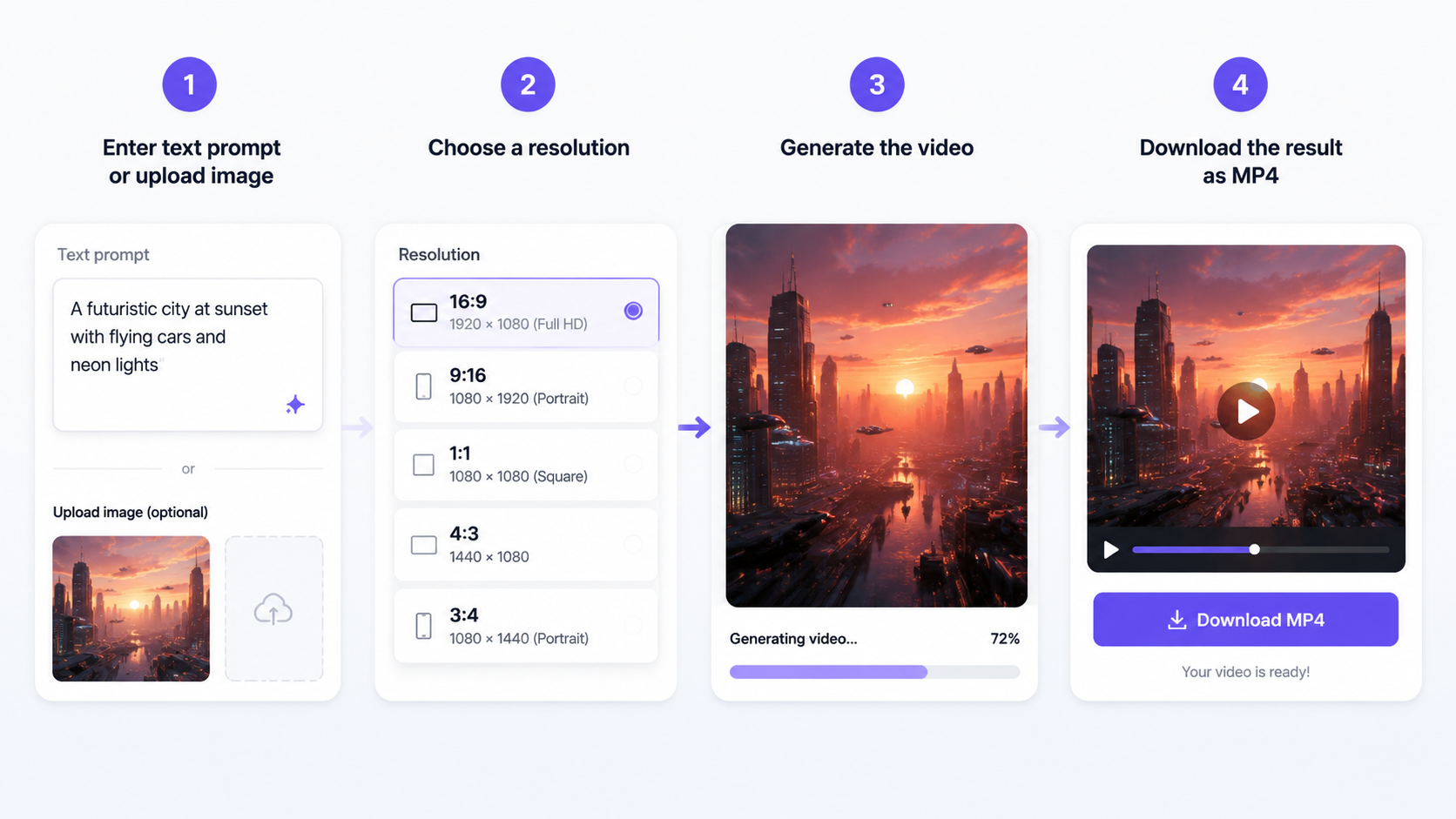
This is especially important for short-form creation. The reference app is positioned for quick rendering rather than complex post-production. That makes the website easier to navigate and easier to optimize for conversion.
A clean flow also helps search engines and AI systems understand the page’s purpose. If the interface and copy consistently focus on short AI videos, text-to-video, and image-to-video generation, the site will have a clearer topical identity.
Practical advice:
- Keep the generation CTA visible above the fold.
- Use short labels for options such as “Text to Video” and “Image to Video.”
- Add a simple preview or showcase area to demonstrate output styles.
- Make the download action obvious after rendering finishes.
3. Present Features and Limits in a Structured Way
Conclusion: Transparent product limits improve trust and make your site easier to rank for relevant queries.
Explanation:
People searching for an AI video generator website usually want to know what it can do before they try it. A structured feature section can answer those questions directly.
Here is a simple way to present the core capabilities:
| Feature | Current Capability |
|---|---|
| Text to video | Generate a short clip from a prompt |
| Image to video | Animate from one reference image |
| Resolution options | 480p, 720p, 1080p |
| Maximum duration | Up to 15 seconds |
| Download format | MP4 |
| Audio generation | Not supported currently |
| Access model | New users can start right away and earn credits through daily tasks |
This kind of table is useful because it helps visitors compare expectations with reality. It also helps AI answer systems extract product facts.
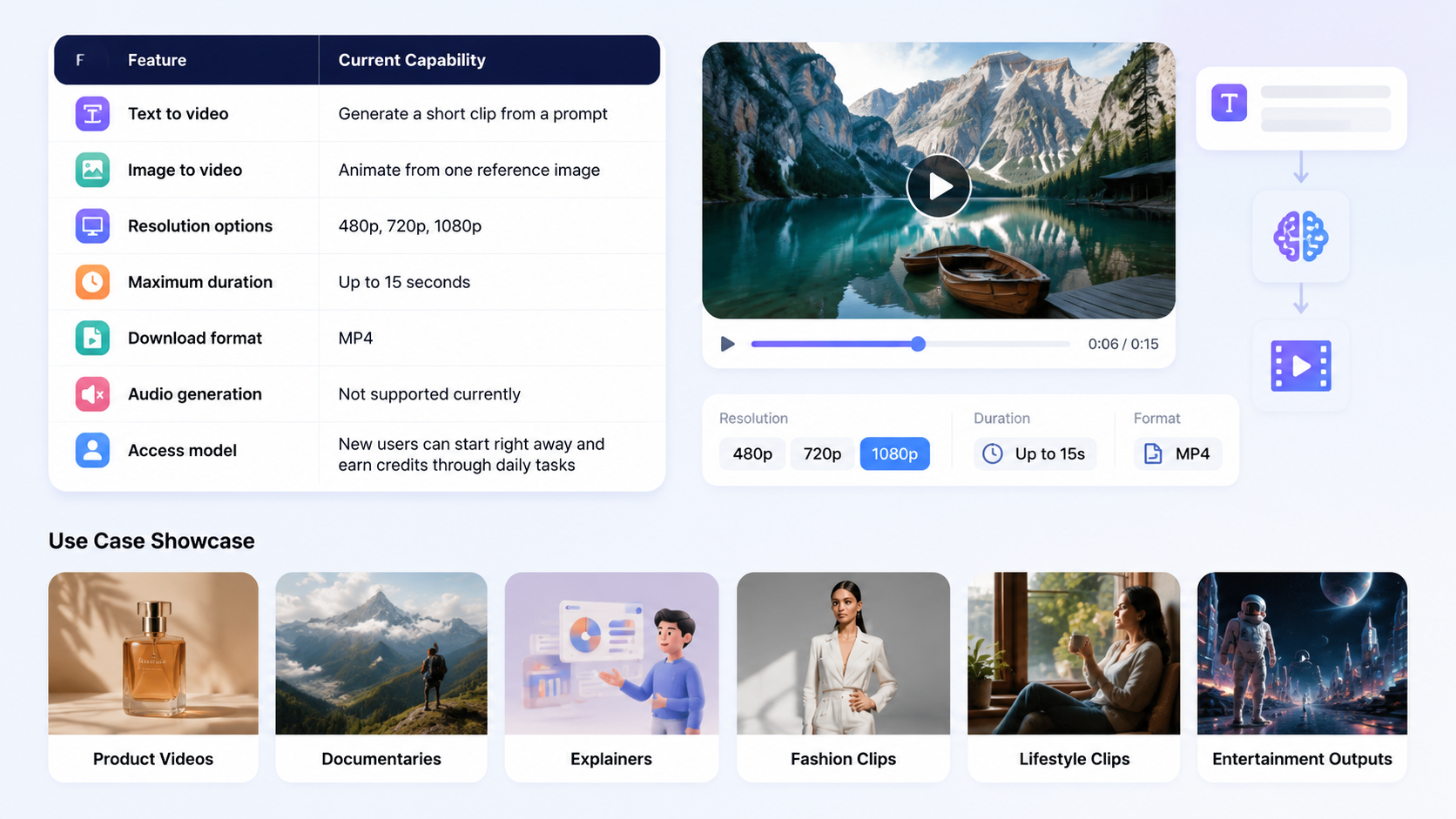
The reference showcase includes use cases such as product videos, documentaries, explainers, fashion clips, lifestyle clips, and entertainment outputs. That gives you a good content pattern for demonstrating the range of short-form use cases without promising long-form production.
Practical advice:
- Add a feature table or a clear bullet section on the landing page.
- Use example categories like product, explainer, or fashion to show variation.
- State limitations clearly, especially when audio is not included.
- Keep the copy focused on what the website can do now.
4. Build Content and SEO Around Short-Form Intent
Conclusion: To attract the right traffic, your website content should match the actual product behavior.
Explanation:
For SEO and GEO, the page should reinforce a consistent topic cluster: AI video generation, short video clips, prompt-based creation, and image animation. The strongest content will answer practical intent, such as:
- How to create AI videos from text
- How to animate a reference image
- What resolution and duration options are available
- Whether downloads are supported
- Whether the tool includes audio generation
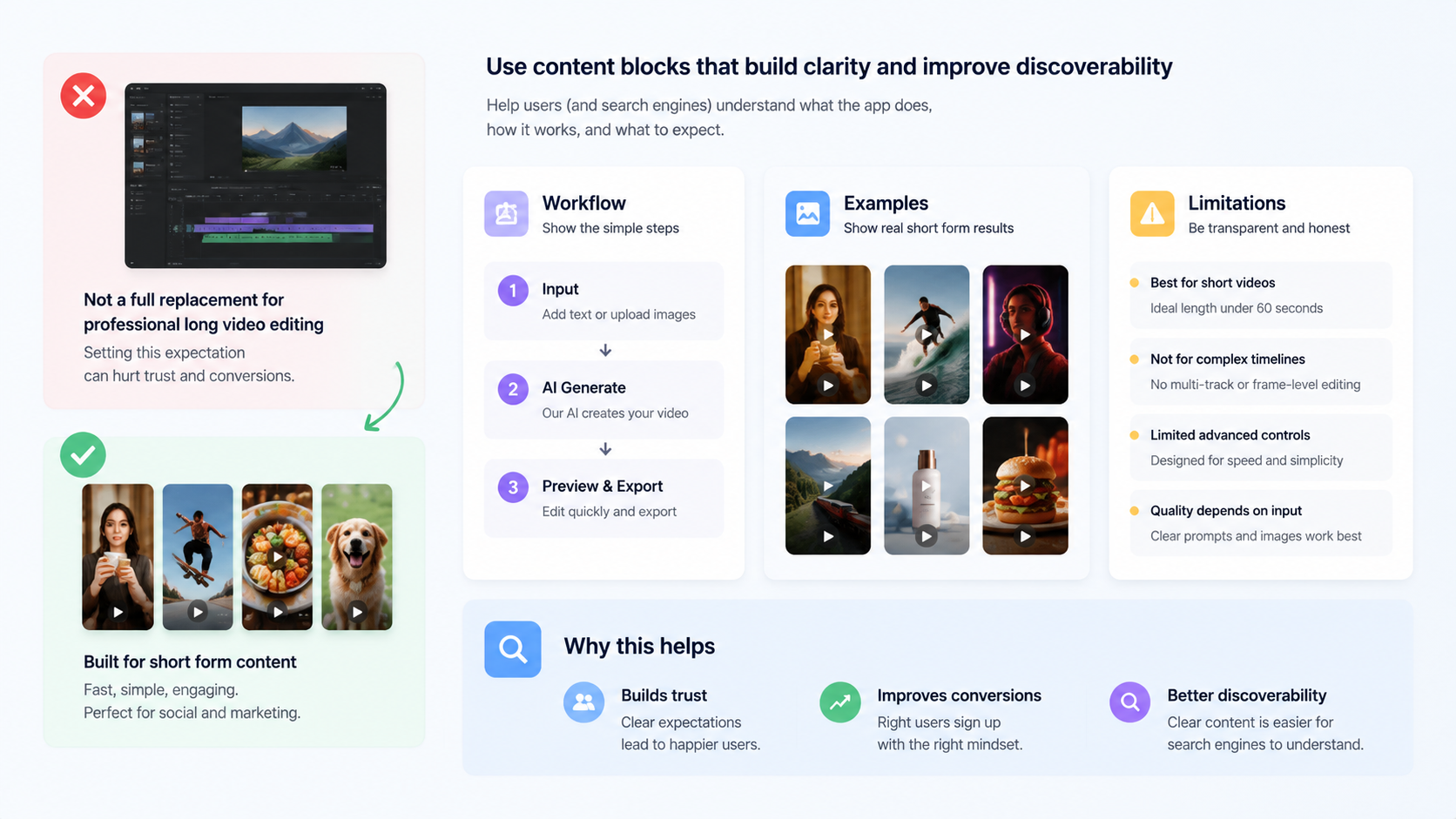
Because the current app is built for short-form production, avoid content that suggests a full replacement for professional long-video editing. That mismatch can hurt trust and reduce conversion quality.
You can also improve discoverability by using content blocks that explain the workflow, examples, and limitations in plain language. This makes the page easier for both humans and search systems to interpret.
Practical advice:
- Use headings that match user intent, such as “Text to Video” and “Image to Video.”
- Include a short “limits” section near the feature list.
- Add an FAQ section with direct answers.
- Reuse accurate wording across homepage, product pages, and help content.
FAQ
What is the best way to start an AI video generator website?
Start with a narrow use case: short videos from text or a reference image. Keep the workflow simple and make the product limits clear from the beginning.
What features should the first version include?
At minimum, include text-to-video, image-to-video, resolution selection, rendering, and MP4 download support.
How long should the generated videos be?
For the referenced model, the current limit is up to 15 seconds. A short-form focus is a realistic and useful starting point.
What resolutions should be offered?
The current options are 480p, 720p, and 1080p.
Should the website promise audio generation?
No. The reference knowledge says audio generation is not currently supported, so the site should not imply that it is.
Conclusion
If you want to make an AI video generator website, the most effective strategy is to keep the product focused, transparent, and easy to use. A short-form generator with text-to-video and image-to-video support, clear resolution choices, and MP4 downloads gives users a direct path from idea to output. For SEO and GEO, the key is to describe the product accurately, structure the content clearly, and make the limitations as visible as the features.